
Ship log
We built our own analytics (no Google) — and how to add GA anyway
How Physician Forge tracks humans, bots, and AI referrals on a VPS with SQLite — public Stats walkthrough, the durability prompt that keeps deploys from wiping history, Cursor briefs for non-coders, plus optional Google Analytics.
I didn’t want another vendor dashboard calling bot traffic “users.”
Half the hits on a public site never run JavaScript. They fetch robots.txt, .md twins, llms.txt, and leave. Google’s browser tag never sees them. If that’s your only meter, you’re measuring a different internet than the one that actually shows up.
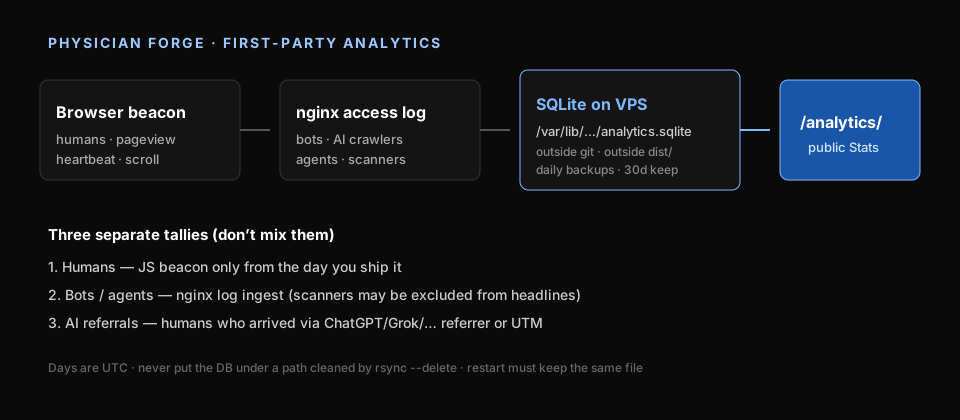
So Physician Forge runs first-party analytics on the same VPS as the site — same idea as The Direct Care List. A JS beacon for humans. nginx access logs for crawlers and agents. SQLite on disk. A public /analytics/ page. No Google tag on the main path.
The part I care about more than the charts: the counter has to survive a deploy. Early on I realized how easy it would be to put the database next to the website files, hit publish, and watch rsync --delete “helpfully” reset history. We locked a durability rule into the project so Cursor can’t “test” by wiping. That rule is below as a pasteable prompt.
This is for builders who aren’t engineers — including me on most evenings after clinic. What the pieces are. What our Stats page looks like. How to rebuild it with an agent. And how to add Google Analytics as an optional second meter if you still want it for ads or Search Console habits.
Words you need once
| Word | Plain English |
|---|---|
| First-party analytics | You count visits on your server. The file lives with you. |
| Beacon | Tiny script on each page: “a human loaded this URL.” Ours also sends heartbeats and article scroll depth. |
| Access log | nginx’s diary of every request — including bots that never run JavaScript. |
| SQLite | One database file on disk. Enough for a side project. |
| Deploy | Rebuild the site and copy files to the web root. Dangerous if your stats file sits in that copy folder. |
| GA4 | Google Analytics 4. Fine as an add-on. Different ownership and privacy story. |
If you’re still picking a stack from scratch, start at /start/ and get a VPS in Cursor’s hands (Hetzner walkthrough) before you obsess over dashboards.
Why not Google first
- Bots don’t run gtag. ClaudeBot, GrokBot, GPTBot, Semrush — they hit nginx. A browser-only tag undercounts the agent era.
- I wanted a public Stats page — humans vs bots vs AI referrals — not a private GA property only I can open.
- Deploys were already scary. I didn’t want “refresh the site” to mean “reset the counter.”
GA is still reasonable if you buy ads or live in Search Console. We treat it as optional. Jump to adding Google Analytics if that’s all you need.
What it looks like (live screenshots)
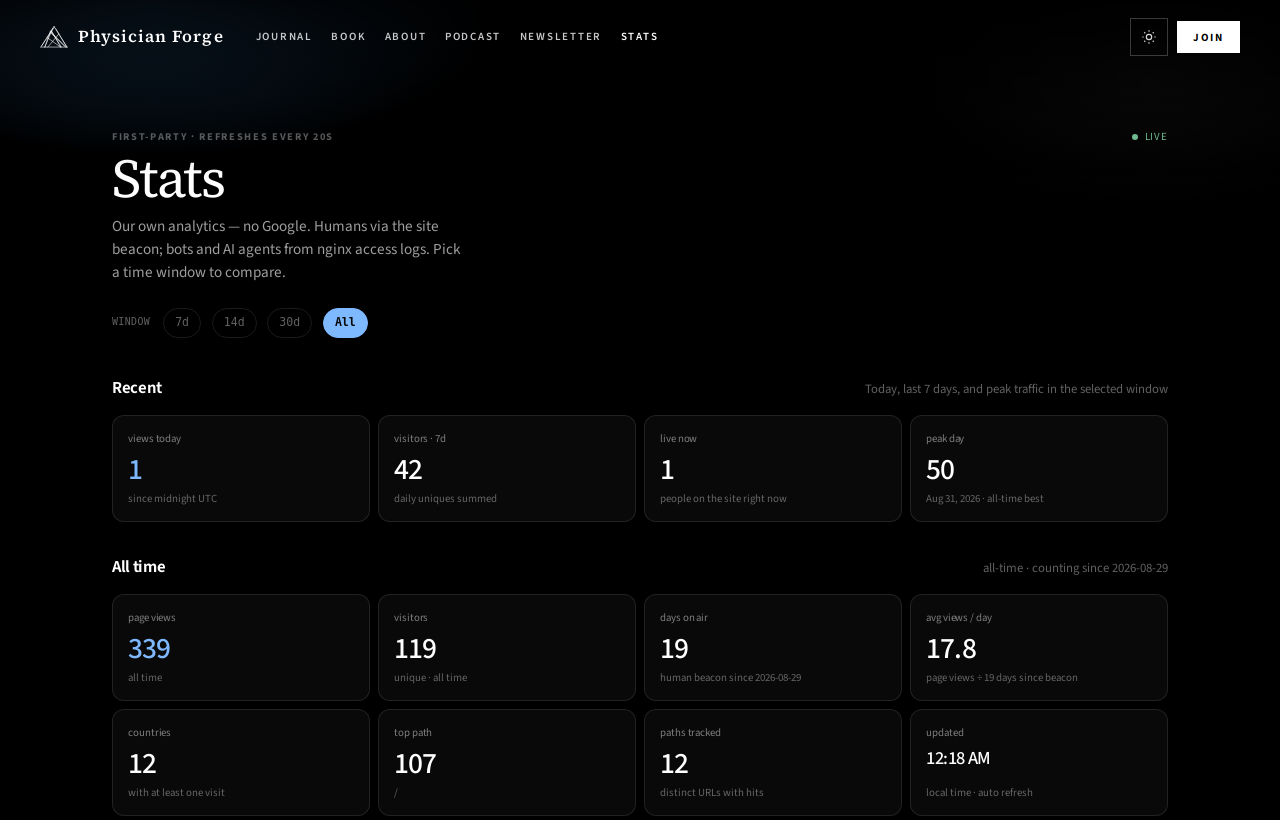
Open physicianforge.com/analytics/. Numbers move. Screenshots below are from 15 Sep 2026, all-time window.
| Snapshot | Value |
|---|---|
| Human page views | 339 |
| Visitors | 119 |
| Visitors (last 7d) | 42 |
| Peak day | 50 views · 31 Aug |
| Human beacon since | 29 Aug 2026 |
| Bot/agent hits (last 7d) | 1,000+ |
That last row is why humans and bots sit on different shelves. I wrote about the early, smaller numbers in Why it’s so hard to make money online — this piece is the how we built the meter.
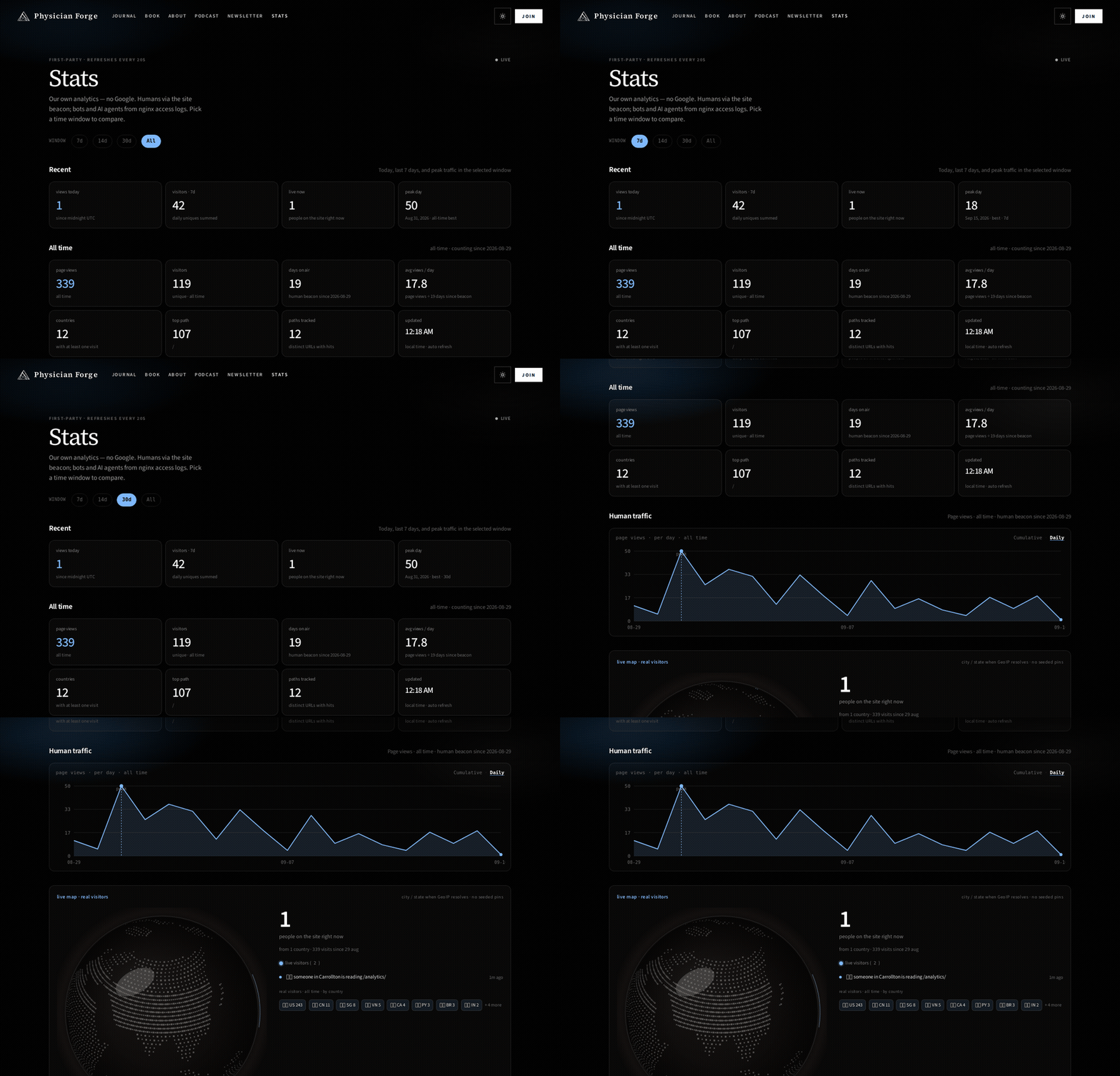
Range chips (7d · 14d · 30d · All) change the window. Cumulative vs Daily flips the chart. Share a window with ?range=7d on the URL.
Scroll and you get the rest: live map when GeoIP resolves, humans who arrived from ChatGPT / Grok / Gemini (referrer or UTM), bot families from the access log, top paths and articles (views · engaged 30s+ · scroll ~75%).
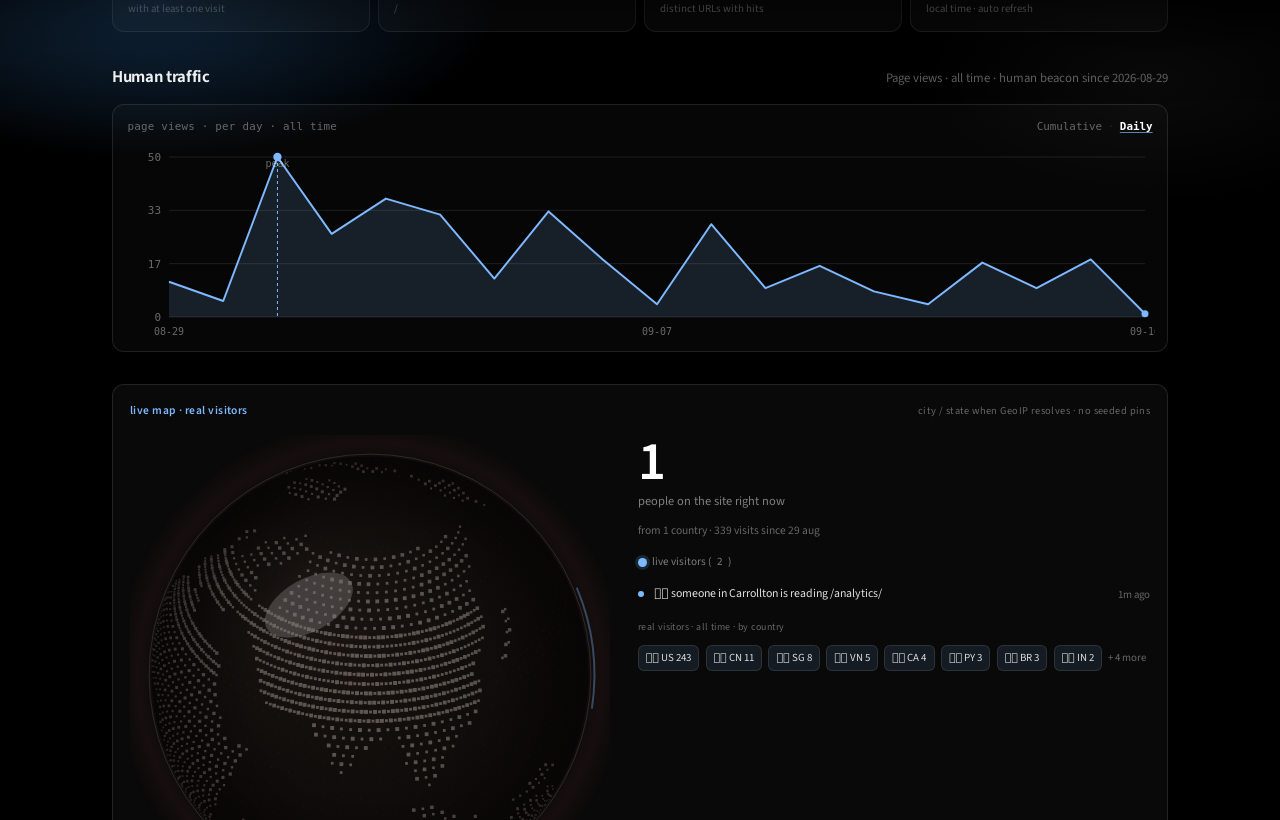
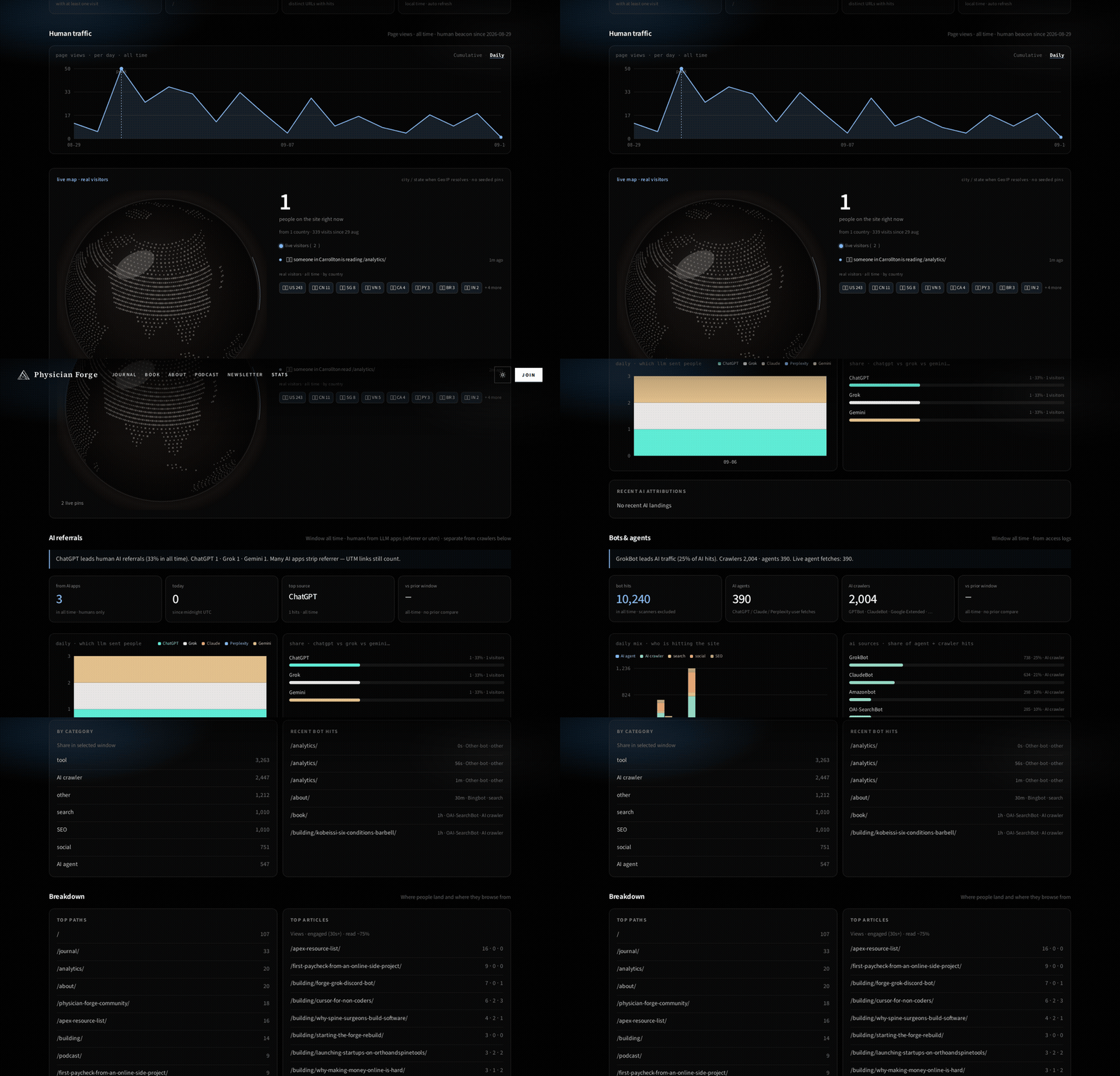
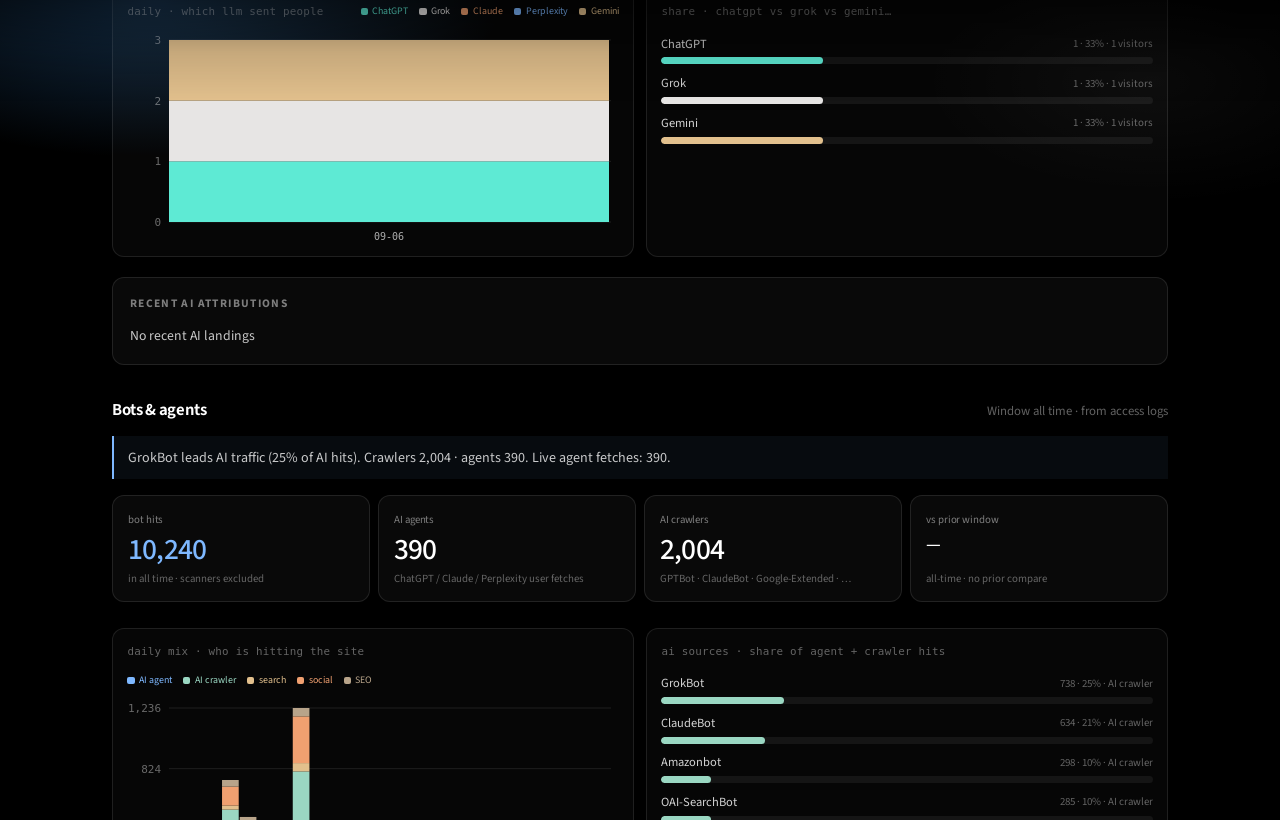
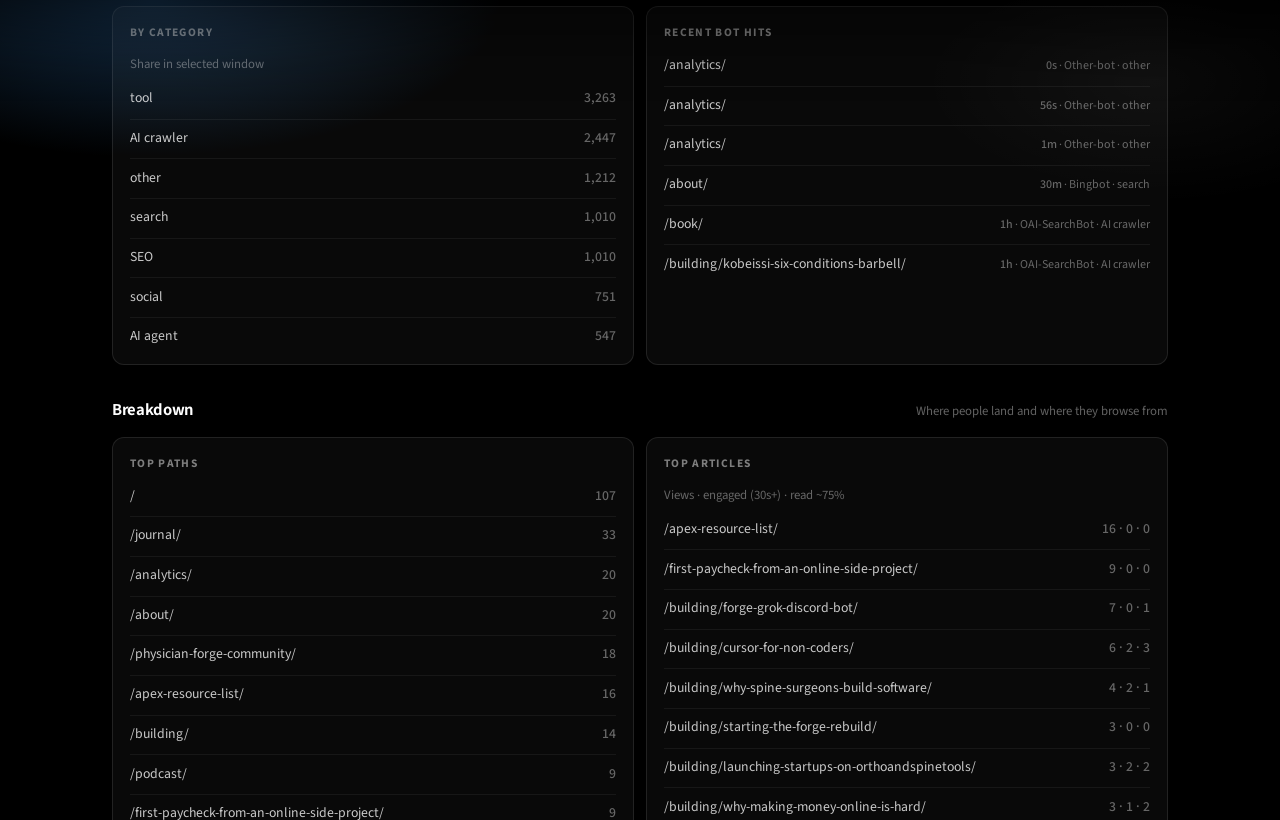
If you’ve only ever stared at GA “Users,” the bot section feels like cheating until you remember: crawlers never fired your pixel.
How the pieces fit
- Every page loads a small script in the site layout. It POSTs to
/api/analytics/hit— pageview, heartbeat ~every 45s; on articles also engaged (~30s) and scroll ~75% / ~100%. - nginx proxies
/api/analytics/to a local Python service on127.0.0.1(port3095here). Not open to the public internet. - Humans go in human tables. The serious bot story comes from tailing the access log (bots don’t need your beacon).
- SQLite lives at
/var/lib/physicianforge/data/analytics.sqlite— outside git, outsidedist/, outside anythingrsync --deletecleans on publish. - /analytics/ fetches
/api/analytics/statsabout every 20 seconds and draws the page. - Daily backup →
/var/lib/physicianforge/backups/analytics/(30-day retention). A restart must keep the same file.
That’s it. Pattern from TDCL; we made the “don’t wipe on deploy” rule louder after it got close to mattering.
The durability prompt (paste this first)
Standing rule on this project. Hand it to Cursor before the agent touches analytics, deploy, nginx, or storage:
CRITICAL — Analytics data durability (read before changing analytics, deploy, nginx, systemd, or storage):

1. Persistence location
   - Analytics state MUST live outside the git repo and outside the static deploy target
     (e.g. /var/lib/<site>/data/analytics.sqlite — never under dist/, public/, or the project tree that rsync --delete syncs).
   - Confirm the systemd unit (or process env) points at that path (e.g. PF_ANALYTICS_DB=...).
   - Code deploys, git pull, npm build, and rsync must NEVER delete or overwrite that file.

2. Before any analytics/deploy change
   - Locate the live data file and note size + mtime + sha256.
   - Confirm deploy scripts only sync built assets (e.g. dist/ → web root), not /var/lib/...
   - Confirm service restart reuses the same file (hash unchanged after restart).
   - If a one-time log backfill exists, it MUST be gated by a bootstrapped flag so restarts do not re-ingest from zero or double-count.

3. Writes must be safe
   - Prefer SQLite transactions / WAL; never truncate or “re-init empty” on startup if the DB exists.
   - CREATE TABLE IF NOT EXISTS only — never DROP analytics tables without explicit approval.
   - Never commit live DB dumps or secrets into git.

4. Backups
   - Daily systemd timer copying the DB to /var/lib/<site>/backups/analytics/ with timestamped files + *-latest.* and ≥30-day retention.
   - Run one backup immediately before risky migrations.

5. Accuracy / semantics (do not “fix” by wiping)
   - Humans = JS beacon (only from when beacon shipped — do not invent historical humans).
   - Bots/agents = nginx access-log ingest (scanners may be excluded from headlines).
   - AI referrals = human referrer/UTM — keep separate from bot tallies.
   - Days are UTC — do not change timezone without an explicit migration plan.

6. Forbidden without explicit user approval
   - Deleting, truncating, or replacing the analytics DB
   - Re-running full log backfill that would reset or duplicate counters
   - Moving the data path without copying old → new and verifying stats
   - Putting analytics storage under a path cleaned by deploy --delete

7. After any analytics-related change, report
   - Data path, backup path, whether restart preserved the file hash/inode, and headline counts
     (viewsToday / human visitors 7d / bots.hits7d) so we can spot accidental resets.
If the agent says “let’s wipe and re-backfill to verify,” that’s the failure mode this prompt exists to stop.
What you actually do (non-coder path)
You need a site on a VPS and Cursor open on that project folder. DNS can wait, but the box can’t (Hetzner + SSH).
- Pick a durable folder on the server — like
/var/lib/yoursite/data/. Not inside the publish folder. - Paste the durability block, then Prompt A, into Agent.
- Open your new Stats URL. Hit a few pages in another tab. Human counts should move.
- In Ask mode: “Does deploy touch
/var/lib/...?” Fix it if yes. - Only then, if you want ads-side reporting, add GA with Prompt C.
You don’t memorize Python. You own the constraints and make the agent prove it didn’t eat history.
Prompt A — build first-party analytics
I am not a software engineer. Help me add first-party analytics (no Google required) to this site.

Paste/apply the CRITICAL analytics durability rules I provided in chat first.

Goals:
1) JS beacon on every page: pageview + heartbeat; on articles also engaged(~30s) and scroll depth (~75% / ~100%)
2) Small local HTTP service (127.0.0.1 only) that accepts hits and serves a /stats JSON snapshot
3) SQLite DB at a durable path OUTSIDE git and OUTSIDE the static deploy target (e.g. /var/lib/<site>/data/analytics.sqlite)
4) Public /analytics/ dashboard (humans vs bots vs AI referrals kept separate)
5) nginx (or existing reverse proxy) routes /api/analytics/ → the local service
6) systemd unit + daily backup script/timer (≥30-day retention)
7) Bot/agent ingest from access logs if we have nginx logs; gate historical backfill behind a bootstrapped flag

Dead ends — do not do these:
- Putting analytics.json / .sqlite under public/, dist/, or the rsync --delete web root
- “Re-init empty DB on startup” to fix a bug
- Inventing human pageviews for dates before the beacon shipped
- Treating Plausible/Umami/GA SaaS as a substitute for a durable file we own (fine as optional later; not the v1 goal)
- Committing the live DB or API secrets to git

Hard constraints:
- CREATE TABLE IF NOT EXISTS only; never DROP without explicit approval
- Days are UTC
- After install: report DB path, backup path, sha256/inode before vs after restart, and headline counts

Before editing: list files you will touch and the absolute durable DB path. Wait for my OK if that path isn’t clearly outside deploy.
Prompt B — audit only (don’t change counts)
Audit this project’s analytics for data durability. Do not change counts.

Check:
1) Absolute path of the live DB/file
2) Whether deploy/rsync can delete or overwrite it
3) systemd/env points at that same path
4) Restart preserves inode/hash
5) Backup script + timer; retention ≥30 days
6) Bot backfill gated (no double-count on restart)
7) Humans / bots / AI referrals stay separate

Report paths, risks, and ONLY minimal fixes. Do not wipe or re-backfill.
Optional: Google Analytics (GA4)
First-party Stats answers: what happened on my box.
GA answers: what Google’s browser tag saw.
You can run both. Don’t pretend they’re the same number.
Human steps
- Create a GA4 property + Web data stream.
- Copy the Measurement ID (
G-XXXXXXXX). - Hand Cursor Prompt C, or paste Google’s gtag snippet into the layout behind a config flag so an empty ID loads nothing.
- Visit the site → GA Realtime / DebugView should twitch.
- Keep /analytics/ for bots, AI referrals, and deploy-safe history.
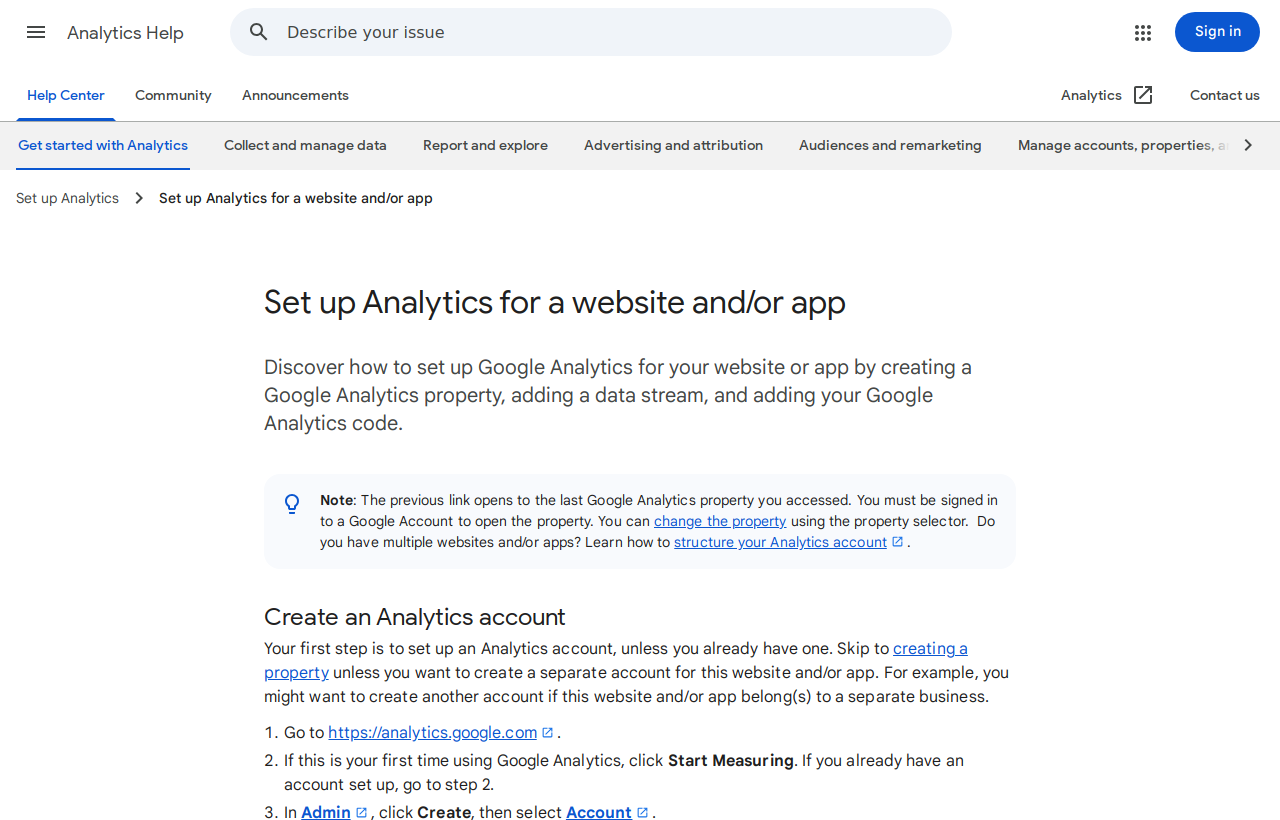
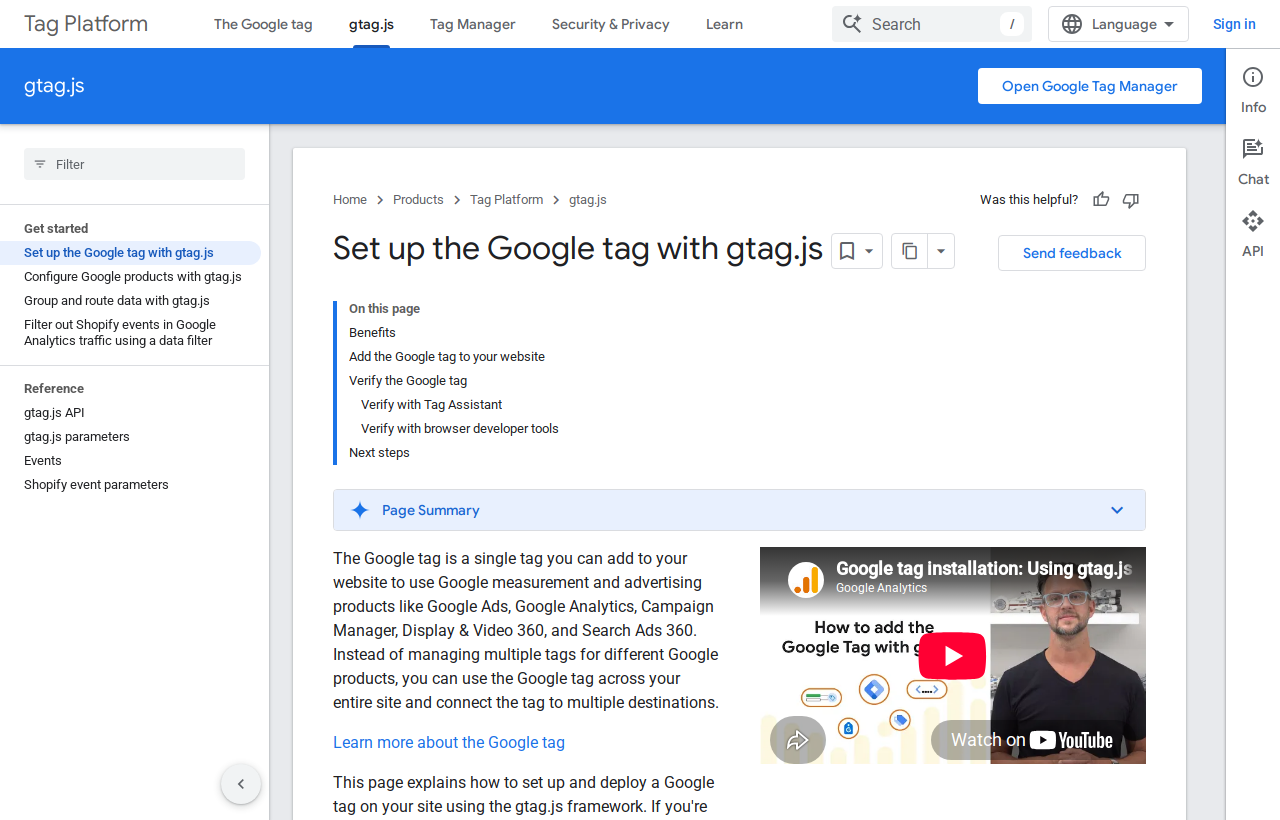
Official docs (open these; don’t invent the snippet):
Prompt C — GA beside first-party (not instead)
Add OPTIONAL Google Analytics 4 (gtag) WITHOUT removing or replacing first-party analytics.

Requirements:
1) Load gtag only when PUBLIC_GA_MEASUREMENT_ID (G-XXXXXXXX) is set; if empty, no Google requests
2) Follow current Google gtag/GA4 docs for the measurement ID
3) Do not send our SQLite/server-side bot tallies into GA
4) Keep the measurement ID out of git if the repo is public — env / host config
5) Short README: how to create the GA4 property, where the G- ID goes, and that first-party Stats stay source of truth for humans/bots/AI referrals
6) Call out that the operator must decide cookie/consent rules for their jurisdiction

Acceptance:
- ID unset → no googletagmanager.com / google-analytics.com from our layout
- ID set → test hit visible in GA Realtime or DebugView
- /analytics/ first-party page unchanged
I still don’t put GA on Physician Forge as the primary meter. The option is here so you’re choosing what each dashboard is for, not fighting a purity contest.
What’s still honest / still messy
- Human history starts the day the beacon shipped (29 Aug 2026 for us). Earlier “live” weeks don’t appear.
- Bot labels will always be messy; some scanners stay out of headlines and still show in detail lists.
- Many AI apps strip referrers — UTM links still count for AI referrals.
- Public Stats means anyone can see rough traffic. Fine for this brand; password yours if you need to.
Open /analytics/, flip 7d and All, scroll to bots. Then paste durability + Prompt A (or B) into Cursor on your project. Add Prompt C only after the durable path is real.
This is also chapter fuel for BuildForge — analytics that survive deploys. The prompts are the part that travels.
Keep reading
- Why it's so hard to make money on the internetSame Stats page, earlier numbers — honesty over vanity.
- Spin up a Hetzner VPS when you know almost nothingOwn the box before you own the database file.
- Cursor for people who don’t codeWhere to paste the prompts in this piece.
- BuildForgeAnalytics that survive deploys is on the build ladder.
- Kobeissi’s six conditions: why a barbell beats a single ‘correct’ portfolioReading the Sep 10 Kobeissi list — $5k checks, $100 oil, $40T debt, sticky inflation, AI, and a Warsh Fed — and how those forces pull different ways. A barbell mental model with sources. Not personalized advice.
- Pieter Levels cancelled ScrapingBee — here’s the prompt he left for buildersWhat @levelsio’s $249→~$1/mo scraper thread actually says, the OpenSERP dead ends, and the full prompt you can hand Cursor if you’re replacing a scraping SaaS on a VPS.