
Ship log
I left Namecheap DNS for Cloudflare so Cursor could manage my domains
Why I moved DNS off Namecheap to Cloudflare: a real API for an agent-first workflow. What DNS is, how to switch nameservers, create a scoped token, and the exact prompts I use for VPS + Amazon SES — with a screenshot walkthrough.

I didn’t leave Namecheap because their domains are bad. I still buy names there sometimes.
I left Namecheap as my DNS host because I wanted an agent-first workflow — Cursor or Claude editing the phone book through an API — and Cloudflare gives you a first-class DNS API for that. Namecheap’s panel is built for humans clicking Manage. That was fine until I was doing the same ritual for every side project: point a VPS, paste Amazon SES records, fix www, wonder which quote mark I typo’d.
The switch, in one sentence:
Keep the domain registrar if you want. Move DNS (the phone book) to Cloudflare so an agent can call an API instead of making you click.
This piece is for people who don’t code. DNS first. Why Cloudflare. A screenshot walkthrough. Then the exact prompts I paste into Cursor or Claude.
What DNS actually is (no jargon required)
DNS is the internet’s phone book.
Humans like names: physicianforge.com. Computers like numbers: something like 178.156.248.249. DNS turns the name into the number (and a few other instructions) so browsers and mail servers know where to go.
When you buy a domain, you don’t own a “website.” You own a name. Someone has to publish the rows that say what that name means. Those rows are DNS records.
| Record | Plain English |
|---|---|
| A | “This name lives at this IPv4 address” — how you point a site at a VPS |
| AAAA | Same idea for IPv6 |
| CNAME | “This name is an alias for that other name” — Amazon SES loves these for DKIM |
| TXT | A sticky note — ownership proofs, SPF, verification strings |
| MX | “Send mail for this domain to these mail servers” |
Two different companies can be involved:
- Registrar — where you buy the name (Namecheap, Cloudflare Registrar, Google Domains legacy, etc.)
- DNS host — where the phone book rows live
You can buy at Namecheap and still point the phone book at Cloudflare. That’s what I did. The registrar keeps billing you for the name. Cloudflare publishes the records. Your agent talks to Cloudflare.
Why Namecheap’s panel pushed me out
Namecheap’s own help article is honest about the workflow: log in → Domain List → Manage → click through DNS options.
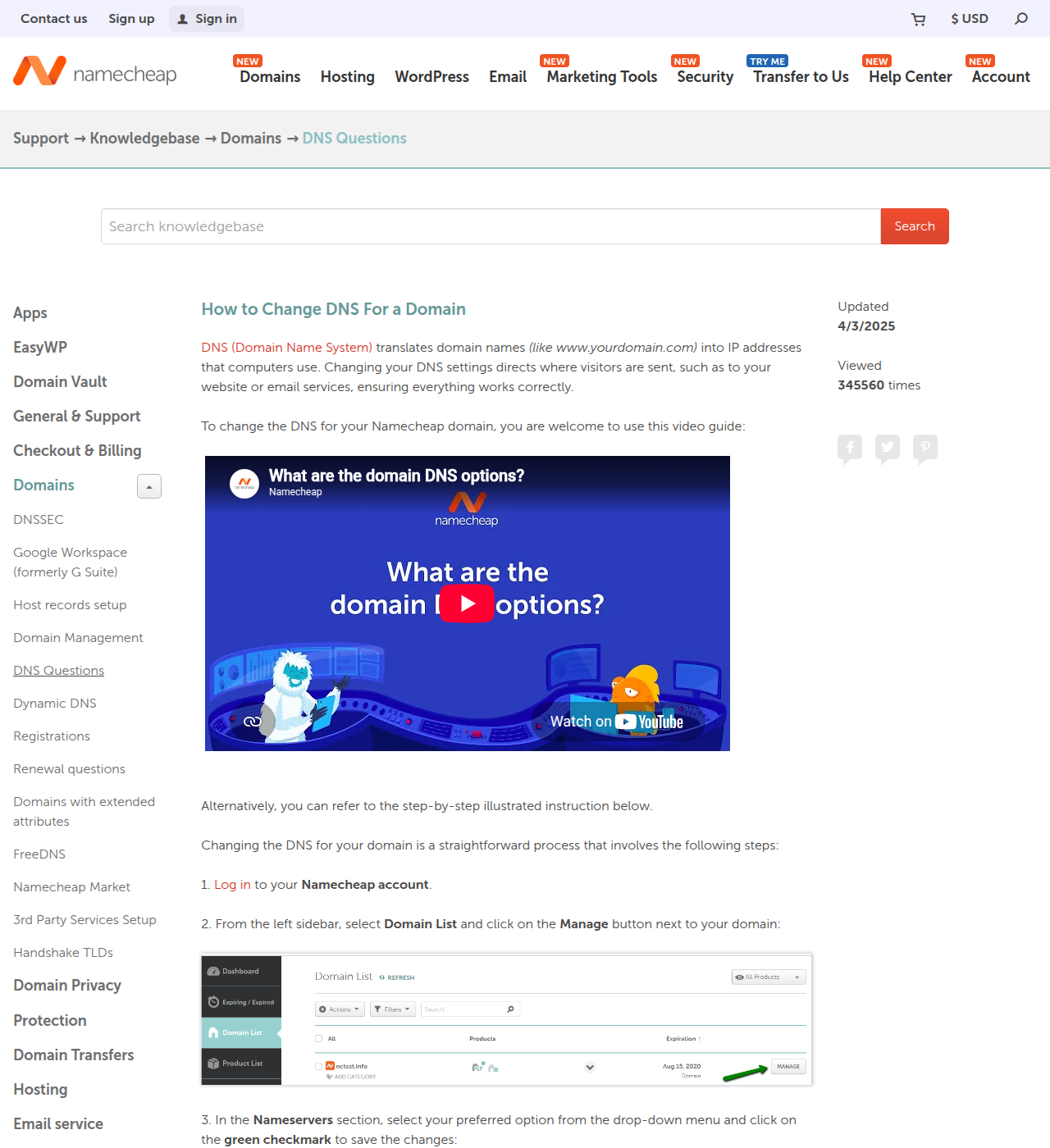
That’s a human UI. It’s fine for one domain on a Sunday.
It falls apart when:
- You’re spinning up another VPS and need apex +
wwwagain - Amazon SES dumps a table of TXT + CNAME values and you mis-paste one
- You’re between cases on a phone and fat-finger a record
- You want Cursor to do the boring transcription while you think about the product
Namecheap has APIs for some things. What I wanted was the boring, well-documented DNS records API that agents already know how to call — list zones, upsert records, show me a table. Cloudflare’s docs are built for that. Their UI even has “Agent setup” links next to the human steps now.
So the reason I switched DNS to Cloudflare was not “Cloudflare is trendy.” It was: I want an agent to do the manual DNS work through an API.
Walkthrough — Namecheap (or any registrar) → Cloudflare → agent
Here’s the path in order. You only fight the dashboards once. After that it’s prompts.
Step 1 — Add the domain to Cloudflare (full / primary setup)
In Cloudflare: onboard the apex domain (example.com), pick a plan (Free is enough for this), let it scan existing records so you don’t start from zero.
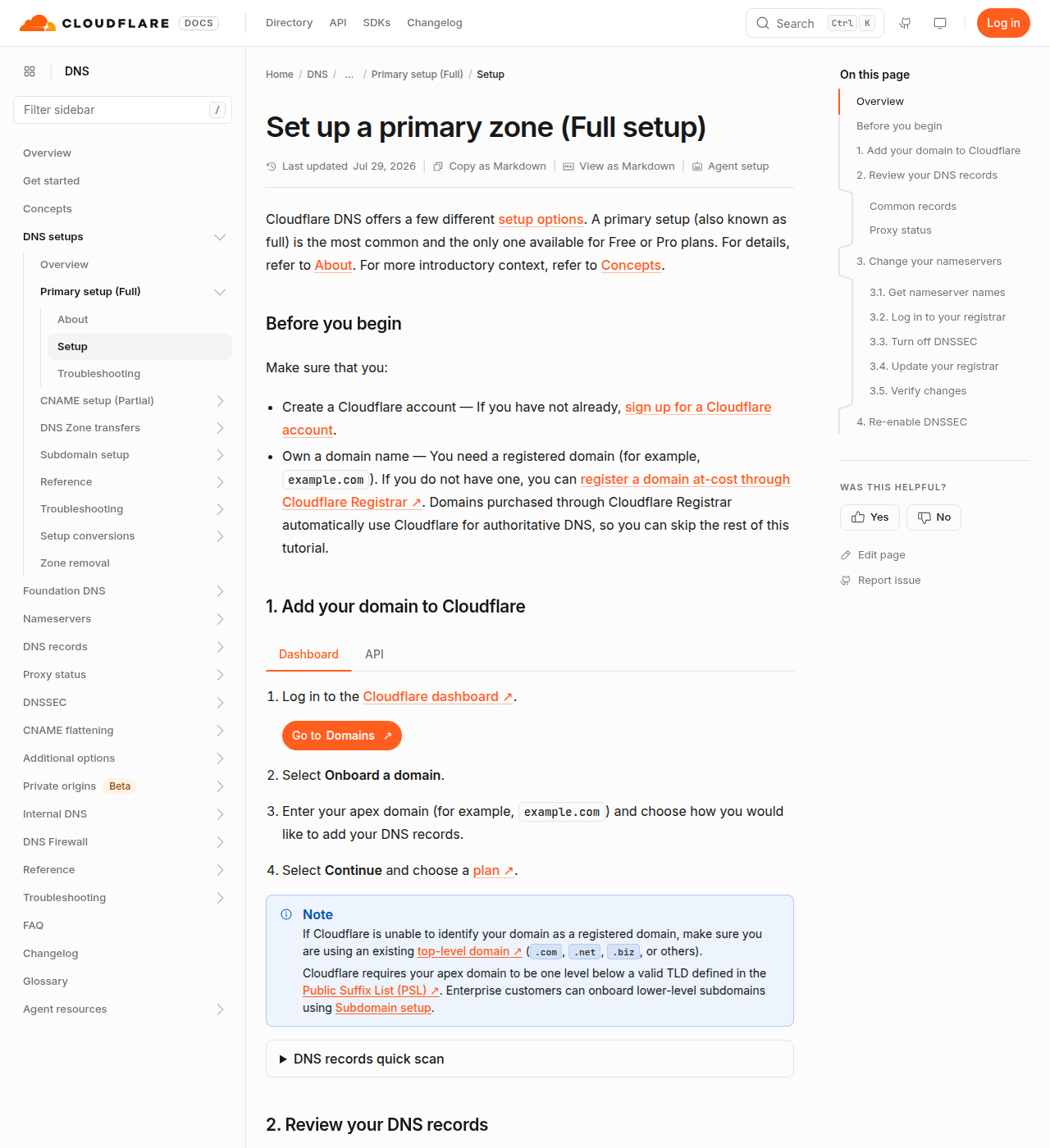
Official guide: Set up a primary zone (Full setup).
Cloudflare will show you two nameservers that look like ada.ns.cloudflare.com / bob.ns.cloudflare.com (yours will differ).
Step 2 — At Namecheap, point nameservers at Cloudflare
This is the actual “switch.” You’re telling the world: don’t use Namecheap’s phone book anymore; use Cloudflare’s.
In Namecheap: Domain List → Manage → nameservers → Custom DNS → paste Cloudflare’s two nameservers → save.
Until this propagates, API edits in Cloudflare won’t matter to the public internet. Give it time. Check with WhatsMyDNS or dig later if you’re curious.
You can keep paying Namecheap for the domain renewal. You’re only moving DNS hosting.
Step 3 — Create a scoped API token (Edit zone DNS)
Do not make a god-mode key. Use Cloudflare’s Edit zone DNS template (or custom: Zone → DNS → Edit, limited to specific zones).
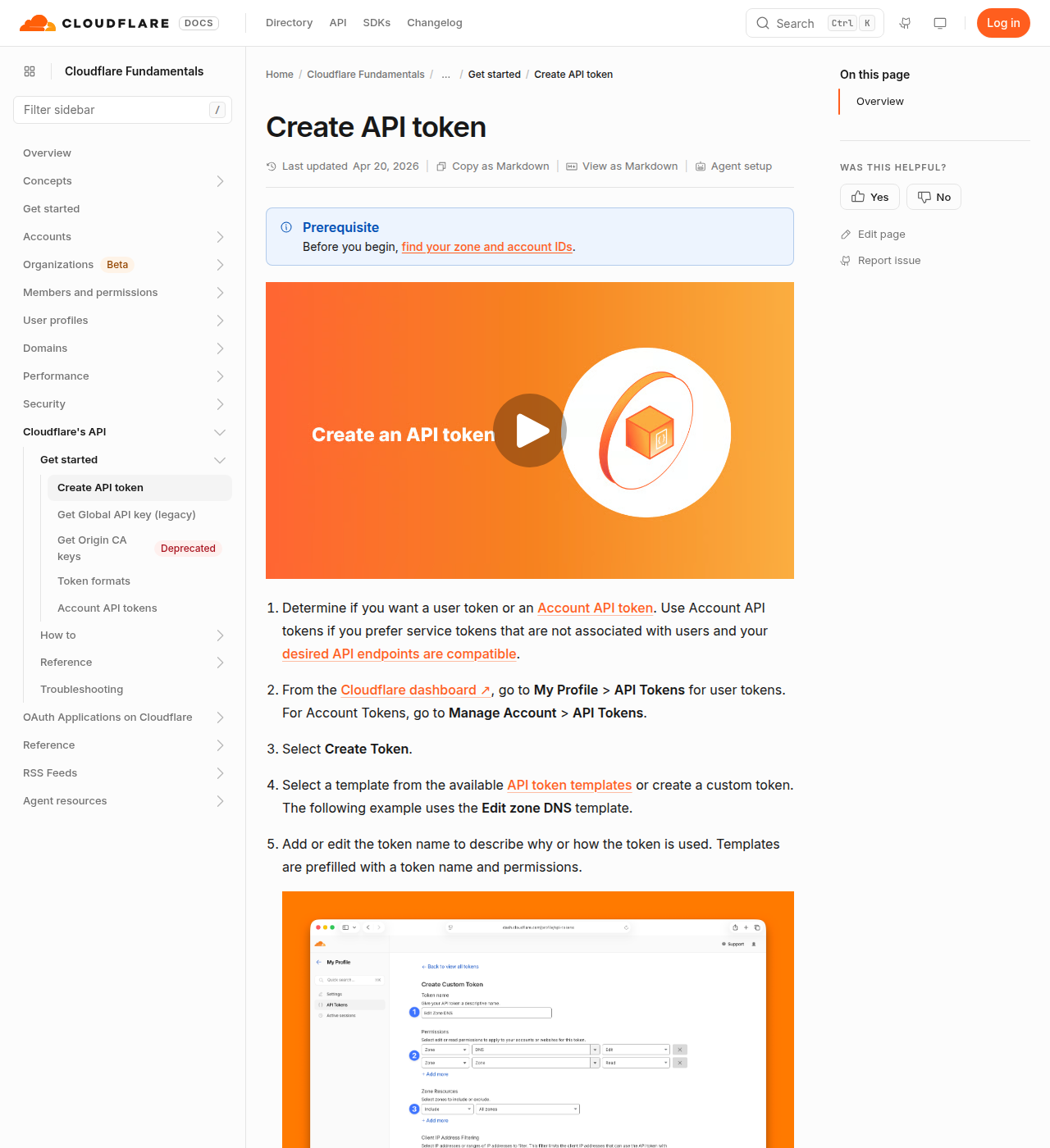
Docs: Create API token.
In the dashboard: My Profile → API Tokens → Create Token → template Edit zone DNS → restrict to the zones you care about → Create → copy the token once.
Put it in a local env file or password manager. Never commit it to git. Never paste it into a public chat or a tweet screenshot.
Step 4 — Hand Cursor or Claude the token + the master prompt
The agent calls Cloudflare’s DNS records API — same phone book as the dashboard, no mouse.
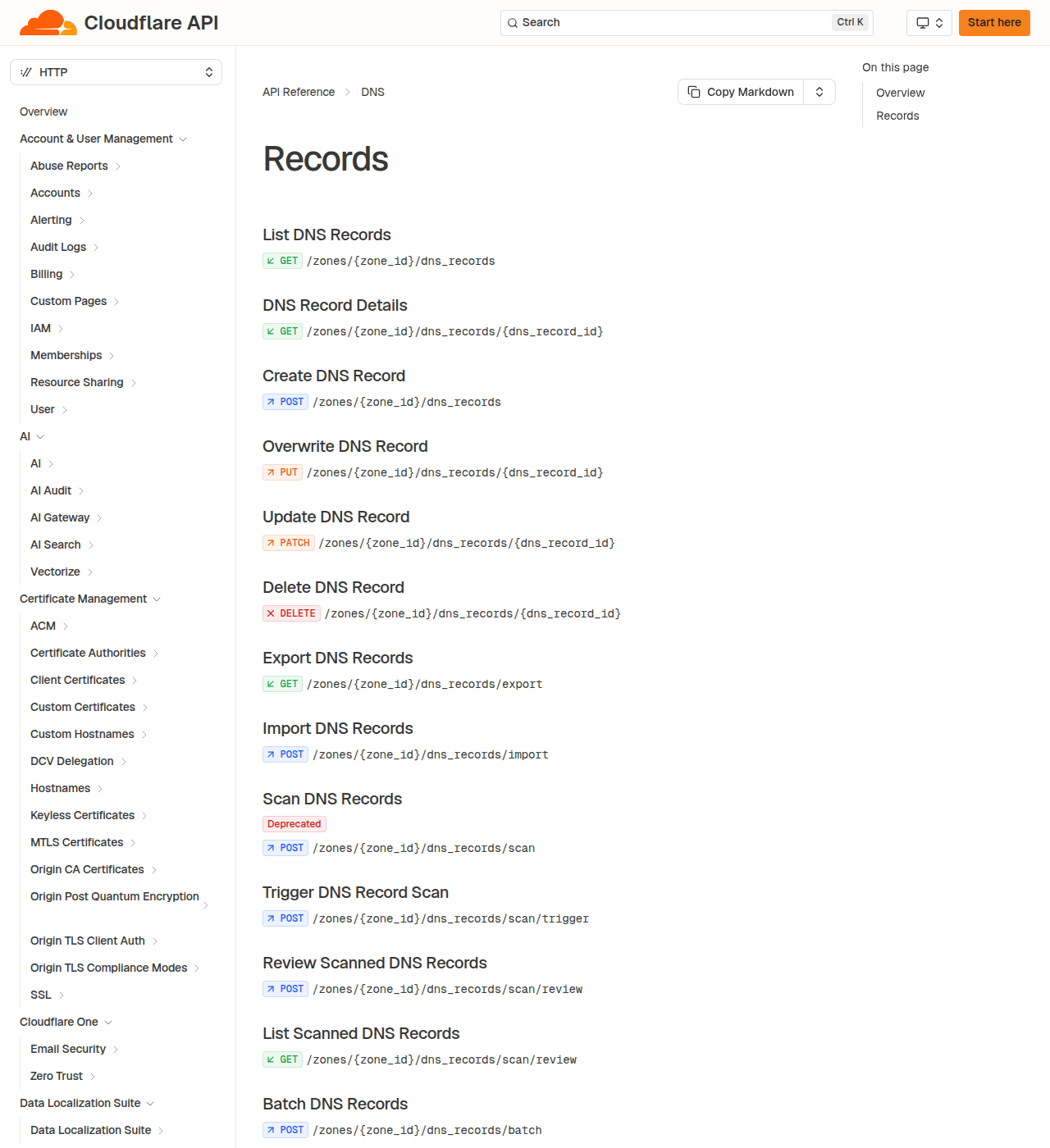
API reference: DNS records.
The flip-book version
Same four beats as a short GIF:
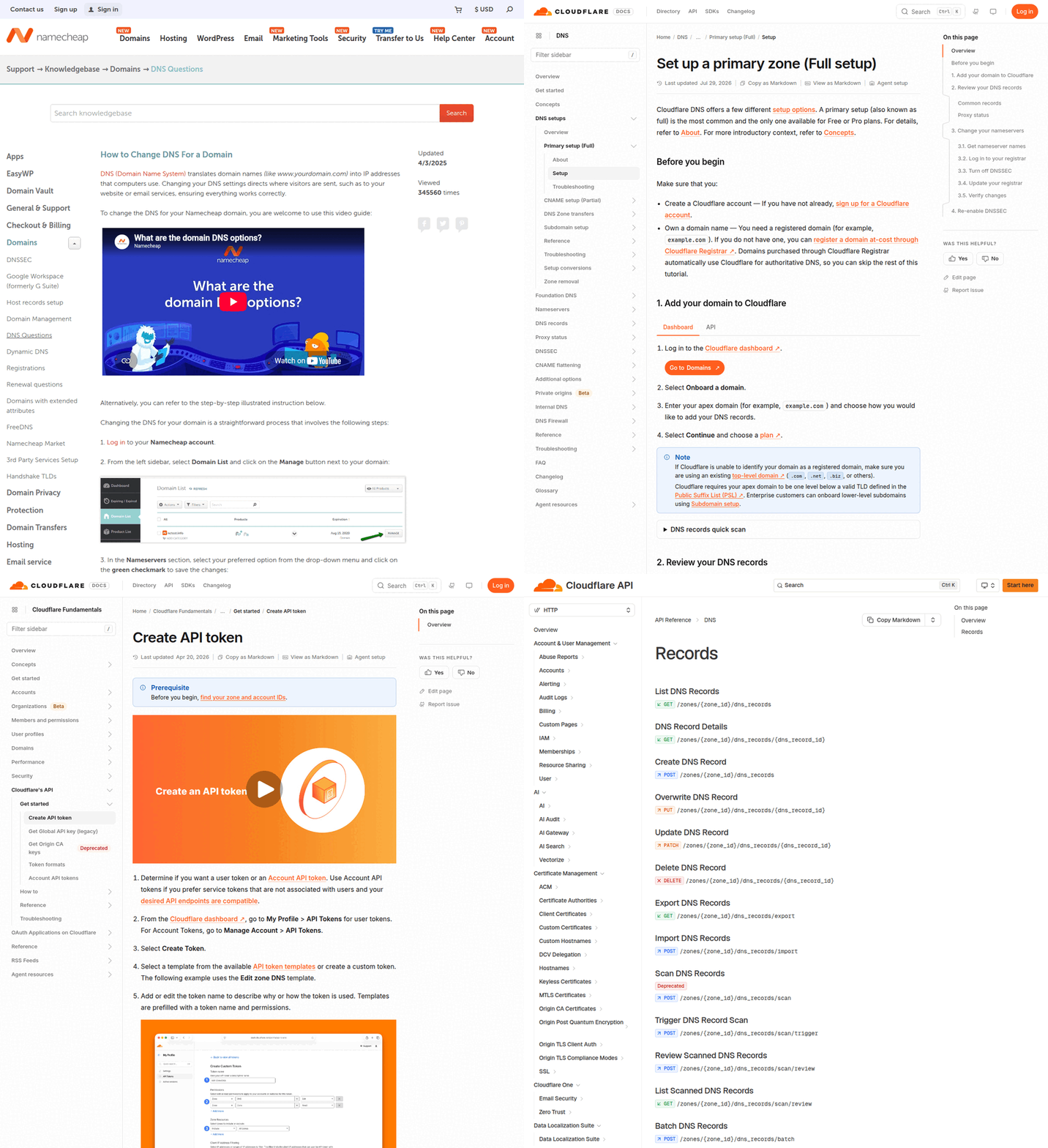
The master prompt (copy / paste)
Use this in Cursor or Claude after the token is available to the agent (env var, .env the agent can read, or a one-time paste in a private chat — never in a public repo).
You are helping me manage DNS on Cloudflare via their API. I am not a developer.

Context:
- My DNS host is Cloudflare (full setup). Registrar may still be Namecheap — do not change registrar settings unless I ask.
- I have a Cloudflare API token with permission to edit DNS on my zones only.
- Prefer the official Cloudflare DNS records API. Show a plan before you change anything. Never delete records I didn’t ask about (especially MX, SES, verification TXT).

Safety:
- Do not print the full API token back to me.
- DNS-only (grey cloud) unless I ask for proxied (orange cloud).
- After changes, list the affected records so I can verify in the dashboard.

Task A — point a site at my VPS:
1. Find the zone for DOMAIN
2. Upsert A records for @ and www to VPS_IPV4 (DNS-only)
3. Summarize before/after in a table

Task B — Amazon SES (when I paste AWS’s table):
1. Create/update each TXT/CNAME exactly as AWS shows
2. Do not invent record names
3. List the zone afterward and flag mismatches

Start with Task A.
DOMAIN = example.com
VPS_IPV4 = 203.0.113.10
Replace DOMAIN and VPS_IPV4. For SES, paste AWS’s table under Task B and say “run Task B now.”
Shorter prompts I actually reuse
VPS only
Zone
example.com. Upsert A for@andwwwto203.0.113.10, DNS-only. Leave MX and TXT alone. Table of before/after.
SES paste
Verifying
example.comin Amazon SES. Create these records verbatim:
(paste AWS name / type / value table)
Update if the same name+type exists. Then GET and show mismatches.
Audit
For
example.com, list A, AAAA, MX, TXT, CNAME. Flag duplicates or leftovers from old hosts.
Job 1 — Point the domain at a VPS
Server has a public IP. You want the name to open that box.
Usually:
Afor@→ VPS IPv4Aforwww→ same IP (or CNAMEwww→ apex)- Optional
AAAAif you have IPv6
Start DNS-only until nginx and HTTPS work, then orange-cloud proxy if you want Cloudflare in front. Ask the agent which mode a record is in so you’re not debugging the wrong layer.
Job 2 — Amazon SES without becoming a transcription monkey
Amazon SES sends mail for apps: magic links, receipts, invoices. AWS makes you prove you control DNS.
Typical records:
- TXT — domain verification
- CNAMEs — DKIM
- Later: SPF / DMARC TXT as you harden
Paste AWS’s table into the agent. You still click Verify in AWS. You stop retyping CNAMEs at midnight.
If mail fails after DNS is green, it’s often SES sandbox, wrong “from” address, or SMTP creds — not DNS. Don’t yank records in a panic.
What still sucks
- Propagation: caches lie for a while
- Nameservers still on Namecheap BasicDNS: Cloudflare API edits won’t go public
- Over-scoped tokens: your fault if you mint a god key
- DNS can’t fix a bad nginx
server_nameor an unverified SES identity
Why this matters for physician-builders
“Just get the domain on the server” and “just get email working” are phone-book jobs, not coding jobs.
I moved DNS to Cloudflare so Cursor and Claude could do that phone-book work through an API — the same agent-first idea as the agent-native primer. Namecheap can still bill me for the name. Cloudflare holds the records. The agent holds the mouse.
Name → address. That’s the whole trick. The API is how you stop clicking every row yourself.
Keep reading
- What agent-native and MCP actually meanWhy agents + APIs beat another dashboard.
- Build projects that agents can actually useProducts shaped so agents can operate them.
- Starting the Forge rebuildHow this site got on its own stack.
- Don't Quit Medicine. Build Leverage.Keep the license. Build anyway.
- We built our own analytics (no Google) — and how to add GA anywayHow Physician Forge tracks humans, bots, and AI referrals on a VPS with SQLite — public Stats walkthrough, the durability prompt that keeps deploys from wiping history, Cursor briefs for non-coders, plus optional Google Analytics.
- Cursor for people who don’t code — download, open a folder, give it a jobA physician-friendly Cursor onboarding: install, open a folder, Agent vs Ask vs Plan, screenshot walkthroughs, and the exact prompts to paste for your first small win.